


DragonSlots App for Danes: Fast, Secure, and Made for On-The-Go Play
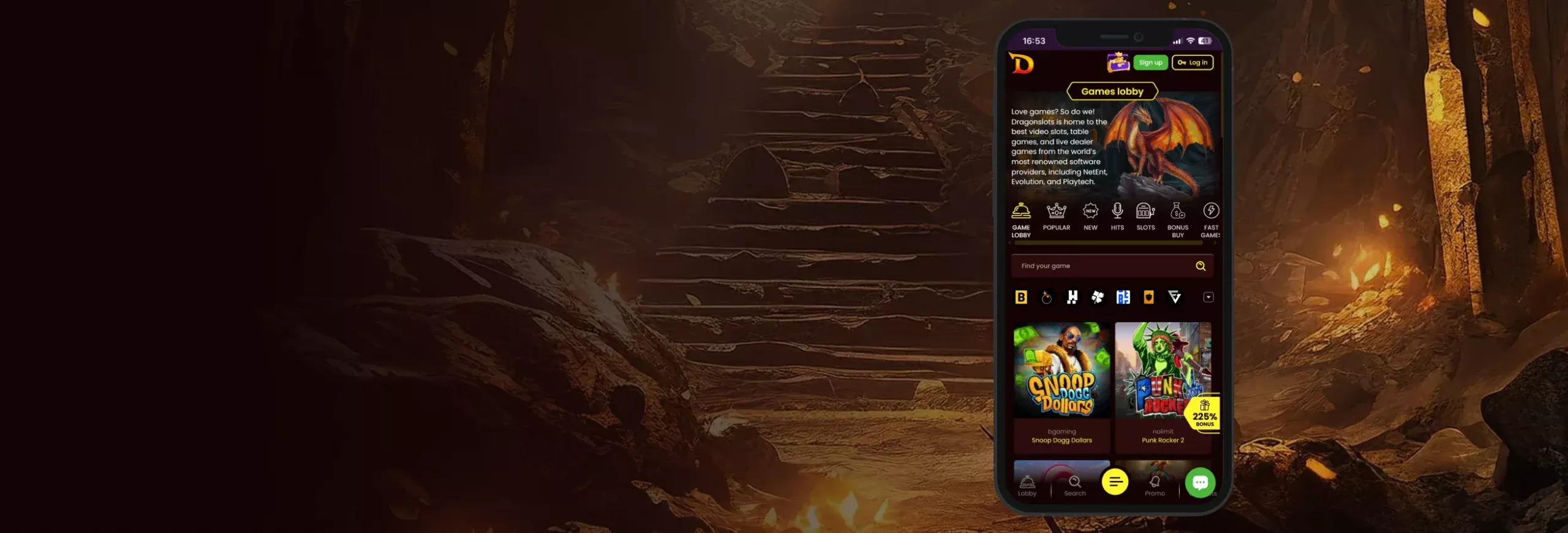
Playing on your phone has never been easier. The DragonSlots App gives Danish players instant access to thousands of real-money casino games — without needing to open a browser or sit at a desktop. It’s the same DragonSlots you know, just faster, lighter, and built to fit perfectly in your hand.
Once you install the app, you’re welcomed with a 10 Free Spins bonus — no deposit required. It’s a simple “thank you” for downloading, and all you have to do is log in after installation to claim it. You can start spinning right away on selected games, test how smooth the app feels, and decide which titles you want to play next.
The app itself is offered in two formats:
- PWA (Progressive Web App) – This version installs directly from your browser and behaves like a native app. It’s fast, safe, and doesn’t take up much space.
- APK for Android – For players who prefer the traditional app experience, DragonSlots provides a downloadable APK right from its official website.
Inside the app, you’ll find a clean, modern layout with quick navigation tabs for Slots, Live Casino, Promotions, and Banking. Every game is optimised for portrait or landscape play, and the graphics adapt automatically to your device. Even the loading screens are designed to be minimal, so you can go from login to gameplay in seconds.
All transactions, whether in EUR or crypto, run through secure, encrypted channels. Combined with two-factor login and device verification, it’s a setup that prioritises safety without slowing you down.
In short, the DragonSlots App brings everything players love about the site into one place: speed, rewards, and complete control from your phone.
How to Download and Install the DragonSlots App
The DragonSlots App is designed to be quick to install and easy to run, no matter which device you use. It’s available as both a PWA (Progressive Web App) and a traditional Android APK, so you can choose whichever method feels more convenient.
Before starting, make sure your internet connection is stable and that you’re downloading only from the official DragonSlots website. That’s important because it ensures you get the genuine app, free from malware or imitation copies.

PWA Installation for iOS Devices
The iOS version of the DragonSlots App works as a PWA, meaning you don’t need to visit the App Store. Instead, it installs directly through Safari in just a few steps:
- Open Safari on your iPhone or iPad and go to the official DragonSlots Denmark website.
- Tap the Share icon at the bottom of your screen (the square with an arrow).
- Scroll down and tap Add to Home Screen.
- Name it “DragonSlots” or leave the default name, then tap Add.
- The DragonSlots App icon will now appear on your home screen.
Tap it once, and it’ll open just like a native app — full-screen, smooth, and ready for real-money play. The PWA updates itself automatically whenever the site adds new features, so you’ll never need manual updates or extra storage space.
 download the
iOS app

PWA Installation for Android Devices
Android users can install the PWA just as easily through Chrome or any other modern browser:
- Visit the official DragonSlots website using your phone’s browser.
- Tap the three-dot menu in the top-right corner of your screen, then select “Add DragonSlots to Home Screen.”
- Tap Install and wait a few seconds.
- You’ll see the DragonSlots icon appear on your home screen.
That’s it — the PWA will now open in full-screen mode, without browser bars or distractions. It behaves almost identically to a traditional app but doesn’t need constant updates or take extra phone space.
 download the
android app

Traditional APK Installation for That Nostalgic Android Experience
If you prefer the traditional app experience, DragonSlots also offers a downloadable APK. This version comes directly from the official website and installs like any other third-party app.
- Go to the DragonSlots Denmark mobile site.
- Tap the yellow menu button at the bottom of the screen.
- From the menu, select “Install App” — the APK file will begin downloading automatically.
- Once the download is complete, open your phone settings: Settings > Apps > Special Access > Install Unknown Apps > Allow Installation.
- Open the downloaded APK file and tap “Install.”
- When installation finishes, the DragonSlots icon will appear on your home screen.
Open the app, log in, and you’re ready to play. After your first sign-in, the app keeps you securely logged in using two-factor authentication and device recognition, so there’s no need to re-enter your password every time.
If the above steps feel a tad bit confusing, there’s an even simpler route. Just head to the Promotions section on the website, scroll to the “Install App Promo” banner, and tap “Install App.” The system will handle everything else automatically.
download theandroid app
App Requirements and Compatible Devices
The DragonSlots App runs smoothly on most modern smartphones and tablets, but checking your device specs before downloading can help avoid slow performance or crashes — especially if you plan to play live dealer games.
The good news is that DragonSlots is highly optimised. Whether you’re using an older Android handset or the latest iPhone, the app adjusts its visuals and animations automatically to fit your screen and connection speed.
iOS Devices
Here are the minimum specs needed to run the PWA on Apple devices:
- OS: iOS 13 or later with Safari up to date.
- Storage: 10-50 MB to cache game files.
- Recommended Models: iPhone X and newer, iPad Air, Mini, and Pro versions
- Performance Tips: Enable Safari’s “Add to Home Screen” feature for smooth PWA operation and automatic updates.
On iPhones, the app runs like a native program — no browser bar, no lag. You can rotate between portrait and landscape during slots or live tables, and transitions remain fluid even on older devices.
Android Devices
For Android users looking to run either the PWA or APK version of the app, the following specifications are recommended for smooth performance:
- OS: Android 10.0 or higher
- RAM: 1 GB minimum (2 GB recommended for live games)
- Free Storage Required: Around 250 MB, only if you want to install the APK. The PWA only requires 50 MB of space to cache game data.
- Tested Devices: Samsung Galaxy A-series, Google Pixel 4/5/6, OPPO Reno, OnePlus Nord, Huawei P-series
DragonSlots performs well even on mid-range phones. The app adjusts video quality automatically during live casino sessions, and graphics scale based on your processor’s capacity.
Network and Performance
A stable internet connection is the key to smooth gameplay on both Android and iOS devices.
- Recommended Speed: 10 Mbps or faster
- Works perfectly on 4G, 5G, and Wi-Fi.
- Adaptive streaming ensures no lag during live tables.
Even if you’re on a slower connection, the app includes a “low-data mode” that trims visuals slightly but keeps gameplay smooth and responsive — perfect for commuters or players using mobile data



App Features and Benefits
The DragonSlots App was built around how people actually play today — on the move, between tasks, or relaxing after work. Every feature feels tuned for convenience, with smooth transitions, fast loading, and no wasted clicks.
Two App Formats: PWA and APK
One of the app’s biggest draws is its dual format. You can choose the lightweight PWA, which launches instantly from your home screen and updates automatically, or the classic APK, which feels more like a traditional app with local notifications and deeper settings access.
Both versions give you the same full-scale casino: over 5,000 games, secure payments, and a layout made for thumbs instead of mouse clicks.
Fast Performance and Easy Navigation
When you log in through the app, you’ll notice how quickly everything responds. Games open in seconds, and your balance, bonuses, and favourites sync automatically with your account on desktop.
The home screen highlights new pokies, trending live tables, and upcoming promotions so you’re never out of the loop.
Try Games in Demo Mod
A big plus for new players is the demo play mode. Almost every slot and table game can be launched in demo mode before you place real bets. It’s the easiest way to test new releases or learn the rules of blackjack and roulette without risk. You can switch to real play instantly once you’re ready.
Advanced Security Features
Security is handled seriously. The app runs on SSL encryption, supports two-factor authentication, and uses device recognition so your account can’t be accessed from unknown hardware.
For extra safety, you can enable fingerprint or Face ID login on supported phones. It’s seamless protection that doesn’t slow anything down.
Fast and Secure Banking
Banking on the app feels just as seamless as the gameplay. You can move money in EUR using Visa, Mastercard, Skrill, Neteller, Trustly, MobilePay, or even crypto. Transfers are secure, processed within minutes, and free from hidden conversion charges.
Exclusive Mobile Bonuses
Install the app and you’ll get something extra right away — an exclusive 10 Free Spins bonus just for mobile users. Once you’re in, the app sends quick push alerts for reload deals, tournaments, and weekend offers, keeping you updated without needing to check the site every time.
Smooth, Secure Gaming Anywhere
Playing on the train, at a café, or relaxing at home, the DragonSlots App holds up perfectly. It’s built with a low-data mode that saves bandwidth, auto-adjusting streams that stop live tables from freezing, and instant reconnect when your signal drops. You can start a slot, lock your phone, and pick up exactly where you left off.
Mobile Web Version
Not everyone likes downloading apps, and DragonSlots understands that. For players who prefer to keep things simple, the mobile web version delivers the full casino experience directly through your browser. You don’t have to install anything, and you’ll still get fast loading, secure logins, and access to all games and bonuses.
Simply open Chrome, Safari, or Firefox, visit the official DragonSlots website, and log in as usual. The entire interface automatically adjusts to your screen size, so buttons, menus, and game tiles fit perfectly on mobile. It feels just like the app, smooth scrolling, full-screen gameplay, and fast responses without any extra setup.
In terms of features, you’re not missing much. The main difference is that web users don’t get push notifications or auto-login. However, it’s still a perfect option if you prefer trying games before downloading or if your device doesn’t meet the app’s storage requirements.
FAQs
Is the DragonSlots App legal in Denmark?
What’s the difference between the PWA and the APK?
Does the app support demo play?
Can I deposit and withdraw in Danish Krone (DKK)?
How do I update the app?
Conclusion
Play Responsibly — DragonSlots promotes balanced gaming. Use features like spending limits, session reminders, and self-exclusion to stay in control. Gambling should always be fun, never stressful. If you ever need support, contact the customer service team. They can connect you with professional help and responsible gaming resources.



